Assignment 9: Trust the Process
Due Friday, March 27, at midnight
The goals for this assignment are:
-
Gain experience working with
forkandexec. -
Implement a multi-process program
Update your repository
Do a git pull to obtain the basecode for this assignment.
Your repository should now contain a new folder named A09.
1. Grep
In the file, grep.c, implement a program that uses N processes to search for a keyword
in a set of files.
Your program implements a simplified version of the bash command grep. Grep searches a list of files
for a given keyword or expression. For example, the following command searches for the keyword public
in a list of source files. We use the find command to generate the list of source files to search.
For example:
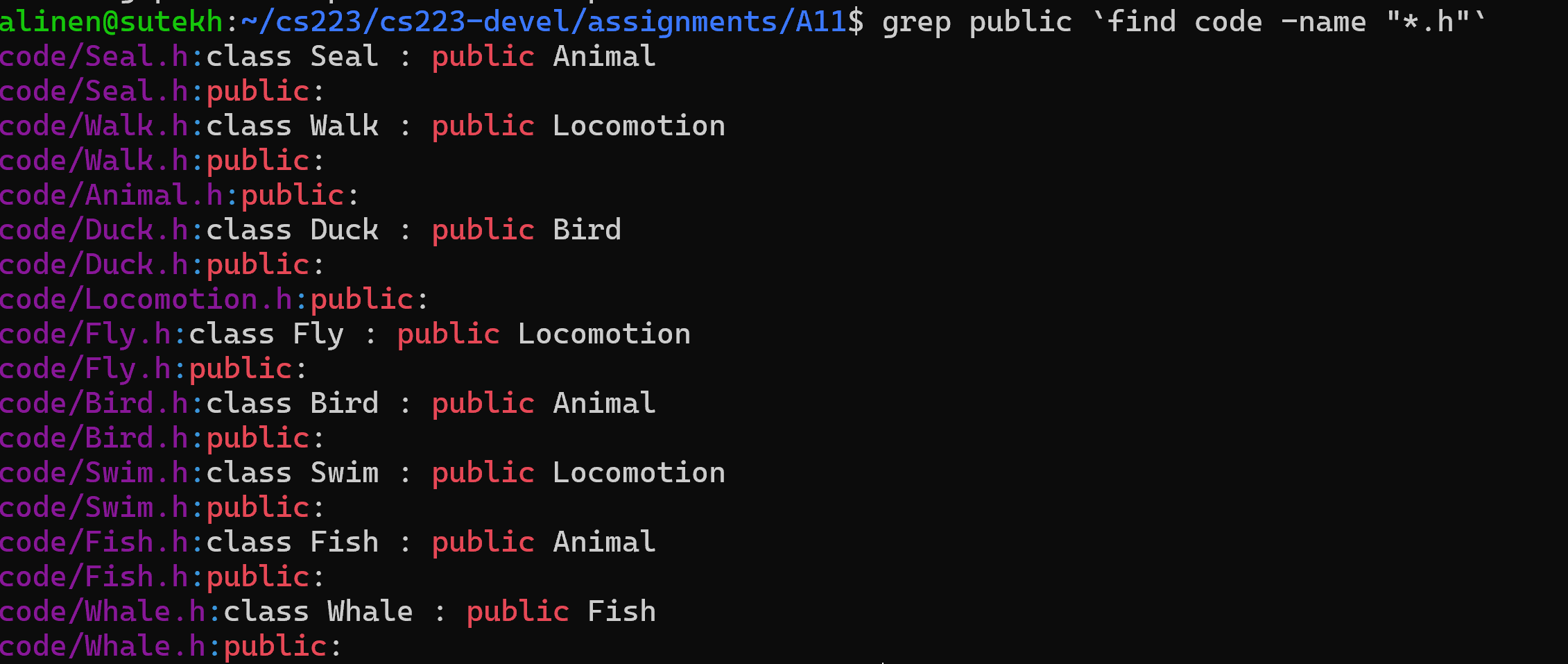
Make sure you include the backticks, e.g. ` . This adds the filenames found by find as command line arguments to grep.
|
$ make grep
gcc -g -Wall -Wvla -Werror grep.c -o grep
$ ./grep
usage: ./grep <NumProcesses> <Keyword> <Files>
$ ./grep 1 class missing.txt
Searching 1 files for keyword: class
Process [613] searching 1 files (3 to 4)
Process [613] Error: Cannot open file
Total occurances: 0
Elapsed time is 0.000608
Requirements:
-
Your program should take the number of processes, keyword, and a list of files as command line arguments
-
Subdivide the files among the N processes. Note that the number of files may not divide evenly between processes.
-
Print the totals and sub-division of files similarly to the output above
-
Use the
fgetsfunction to process the lines in each file -
Use the function
strstrdefined instring.hto search lines of text for the keyword. Documentation is here -
To compute the total count, each child process can return the number matching lines using its exitcode. Recall that the parent can use the status reported by
waitpidto get the children’s exit code. -
Your program should report the amount of time needed to search using
gettimeofday
You can print with colors to the console using ANSI escape sequences (see below).
For example, printf(ANSI_COLOR_GREEN "Green Text" ANSI_COLOR_RESET); will print green text. Here is a good guide!
|
// Helpful macros for working with color
#define ANSI_COLOR_RED     "\x1b[31m"
#define ANSI_COLOR_GREEN   "\x1b[32m"
#define ANSI_COLOR_YELLOW  "\x1b[33m"
#define ANSI_COLOR_BLUE    "\x1b[34m"
#define ANSI_COLOR_MAGENTA "\x1b[35m"
#define ANSI_COLOR_CYAN    "\x1b[36m"
#define ANSI_COLOR_RESET   "\x1b[0m"
2. Personal Shell
In the file, shell.c, implement a program that implements a simple shell.
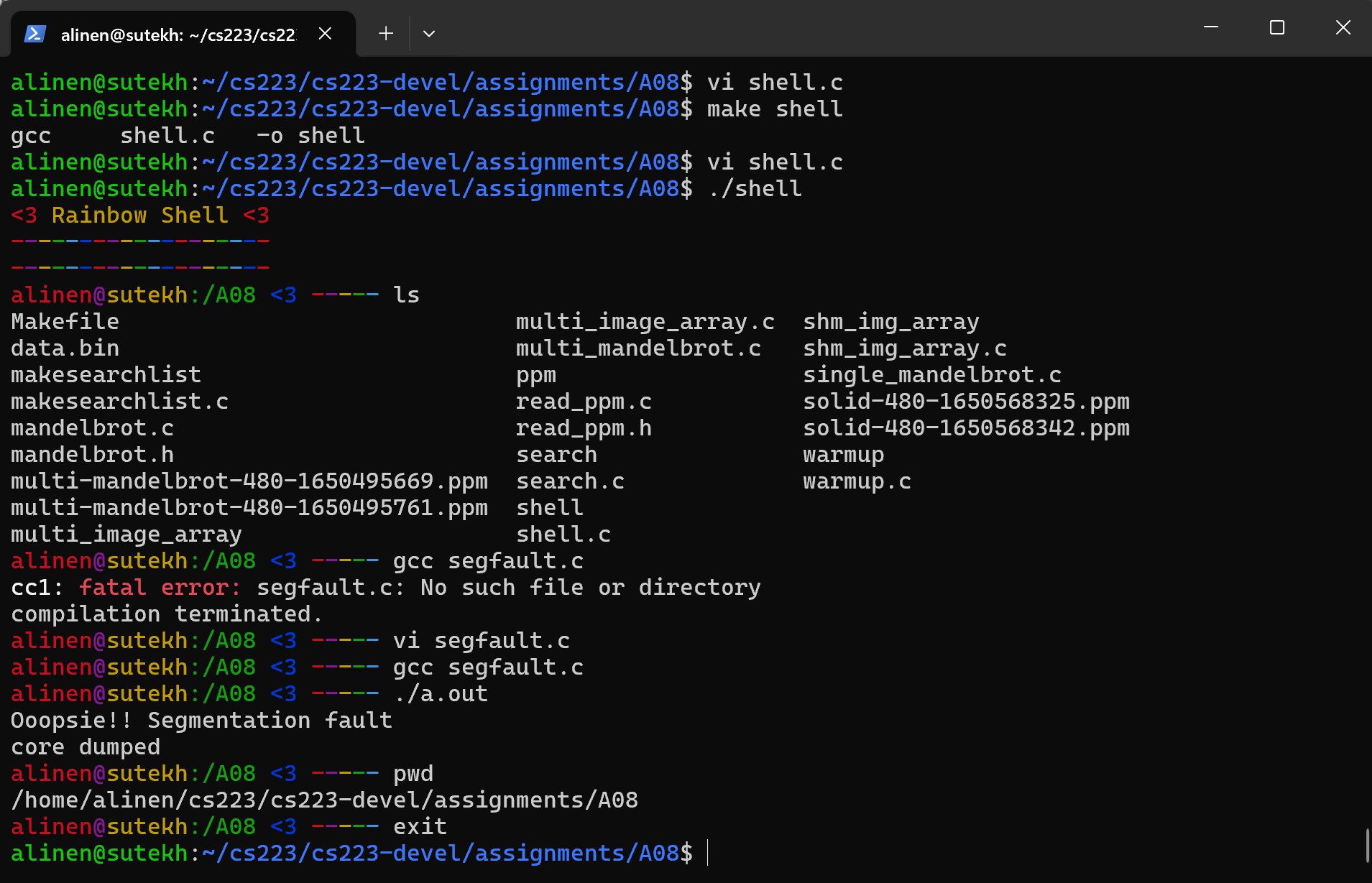
Requirements:
-
Your program should print a prompt. At minimum, your prompt should show the current working directory and look distinct from the lab machine prompts. In other words, it should be easy to tell what shell if running from the terminal.
-
Use the
readline()function to get user input. This function supports backspace, tab completion, and more. Documentation for readline can be found here. -
Use the
add_history()function to save user history. This will allow arrow keys to work. Documentation for readline can be found here. -
Your program should quit if the users types
exit. -
When the user gives a command, split it into a command and arguments and then fork a command to execute it.
-
Your terminal should wait for the command to finish. If the command terminates with an error, report the error.
readline is a package that is installed on goldengate and in our labs. However, you may need to install it on your own machine. On Unix systems, this can be done by running sudo apt install libreadline-dev
|
You can print with colors to the console using ANSI escape sequences (see below).
For example, printf(ANSI_COLOR_GREEN "Green Text" ANSI_COLOR_RESET); will print green text. Here is a good guide!
|
// Helpful macros for working with color
#define ANSI_COLOR_RED     "\x1b[31m"
#define ANSI_COLOR_GREEN   "\x1b[32m"
#define ANSI_COLOR_YELLOW  "\x1b[33m"
#define ANSI_COLOR_BLUE    "\x1b[34m"
#define ANSI_COLOR_MAGENTA "\x1b[35m"
#define ANSI_COLOR_CYAN    "\x1b[36m"
#define ANSI_COLOR_RESET   "\x1b[0m"
Most prompts print helpful information. Above, we use the
system commands gethostname, getcwd, and getpwuid(geteuid()) to get the
machine name, the current working directory, and current user respectively.
|
3. Submit your work
Push your code to github to submit your work
$ git status
$ git add .
$ git status
$ git commit -m "assignment complete"
$ git status
$ git push
$ git status
4. Grading Rubric
Assignment rubrics
Grades are out of 4 points.
-
(2 points) Grep
-
(1.0 points) correct and complete behavior: reports found keywords, counts, and timing
-
(1.0 points) no memory errors, style
-
-
(2 points) Shell
-
(1.0 points) correct and complete behavior: runs commands, reports errors, shows prompt
-
(1.0 points) no memory errors, style
-
Code rubrics
For full credit, your C programs must be feature-complete, robust (e.g. run without memory errors or crashing) and have good style.
-
Some credit lost for missing features or bugs, depending on severity of error
-
-5% for style errors. See the class coding style here.
-
-50% for memory errors
-
-100% for failure to checkin work to Github
-
-100% for failure to compile on linux using make